
Obsidian vs Notion: Which is Better for Academic Research?
Obsidian and Notion both offer unique strengths for academic research. Discover how each platform serves note-taking, complex projects, and data privacy needs.

Obsidian vs Notion for Academic Research: Which is Better?
Understanding Obsidian and Notion
This article is a comprehensive 'notion vs obsidian' comparison, highlighting the key differences between these two note taking tools for academic research. Understanding how each platform serves academic needs will help you choose the right solution.
Obsidian and Notion are popular tools for productivity enthusiasts. Both Notion and Obsidian serve as note taking tools, but each has different strengths and approaches, making them valuable for academic research and other tasks.
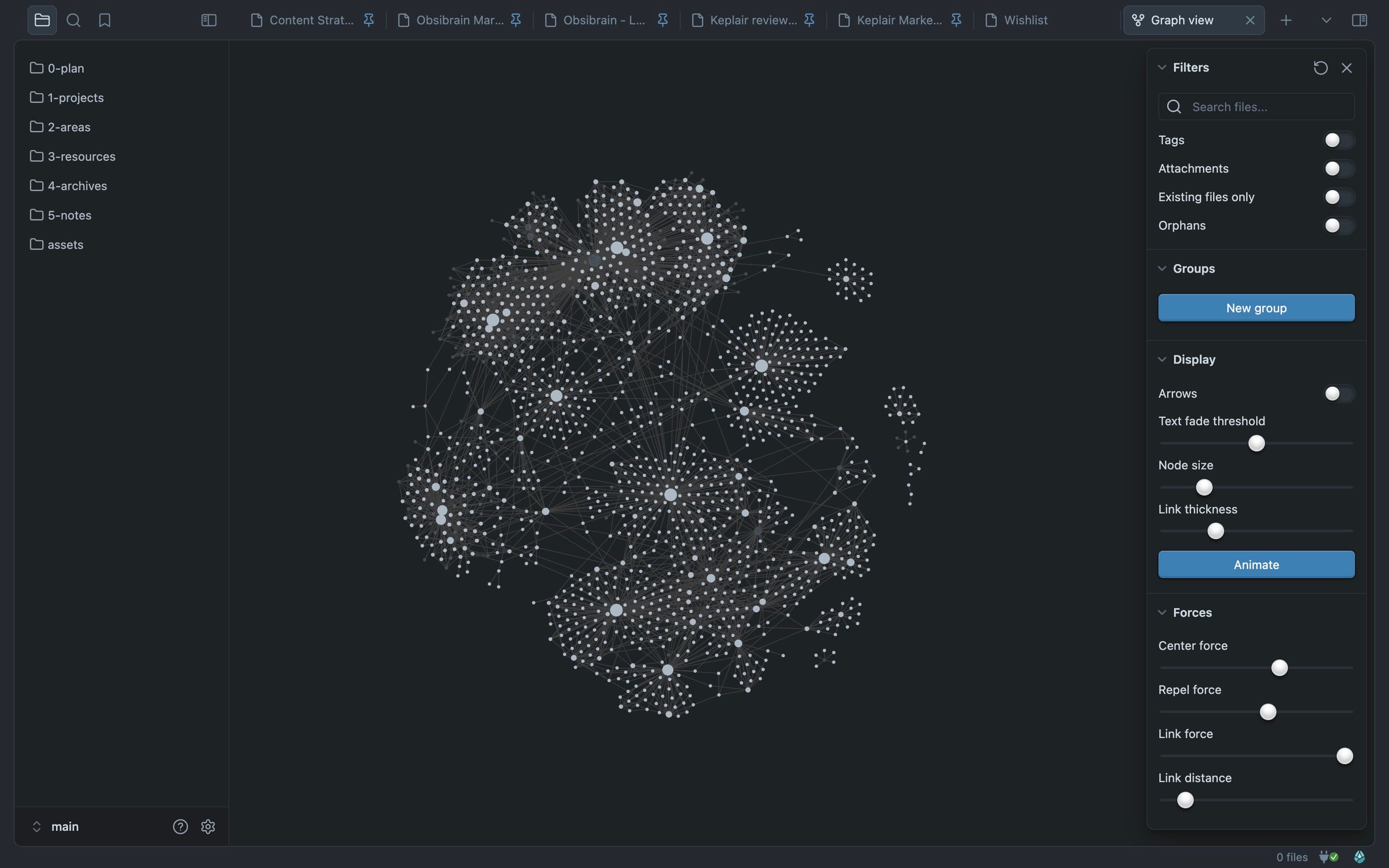
Obsidian shines in note-taking, using bi-directional linking to create a network of connected notes. This helps researchers link different pieces of information. Its offline access ensures your data is always available, even without an internet connection.
Notion is an all-in-one tool. It combines databases, task management, and note-taking, making it powerful for organizing projects and working with others. Its easy-to-use interface lets you customize your workspace to fit your specific academic needs.

While there are simpler note taking apps like Apple Notes and Google Keep for casual or occasional use, this article focuses on more advanced tools for academic research.
We’ll compare how Obsidian and Notion perform in academic research, examining their features and effectiveness for scholars and students.
Key Features of a Note Taking App for Academic Research
When it comes to academic research, the right tools can make all the difference. Let’s break down how Obsidian and Notion handle key features like note-taking, organization, and citation management.
-
Markdown Support: Obsidian excels here. With full Markdown support, you can format text effortlessly and include complex elements like LaTeX for typesetting math. This makes it a go-to for academic writing.
-
Knowledge Linking: Obsidian’s bi-directional linking creates a dynamic network of related notes. This feature is invaluable for researchers who need to connect various pieces of information and see how they relate.
-
Local File Storage: Obsidian stores files locally, ensuring your data is always accessible, even offline. This is a significant advantage for those who work in environments with unreliable internet access.
-
Organization: Notion’s strength lies in its project management capabilities. Its databases and hierarchical structure allow for detailed organization of research projects, making it easier to track progress and deadlines. Notion’s relational databases enable users to turn simple notes into actionable tasks with deadlines, owners, and status boards, which is especially useful for managing large databases and complex research workflows.
-
Collaborative Tools: Notion shines in team settings. With features for real-time collaboration, you can easily share and co-edit documents, which is ideal for research teams. Notion also excels at organizing and sharing meeting notes and includes the Notion calendar to help teams schedule and manage events within the workspace.
-
AI Features: Notion automates many processes with its native Notion AI built directly into the editor, streamlining workflows such as summarizing research, linking pages, and integrating with third-party apps to enhance efficiency.
-
Citation Management: Both tools fall short here. Neither offers built-in citation management, so you’ll need external tools like Zotero. However, Obsidian’s plugin ecosystem allows for some integration.
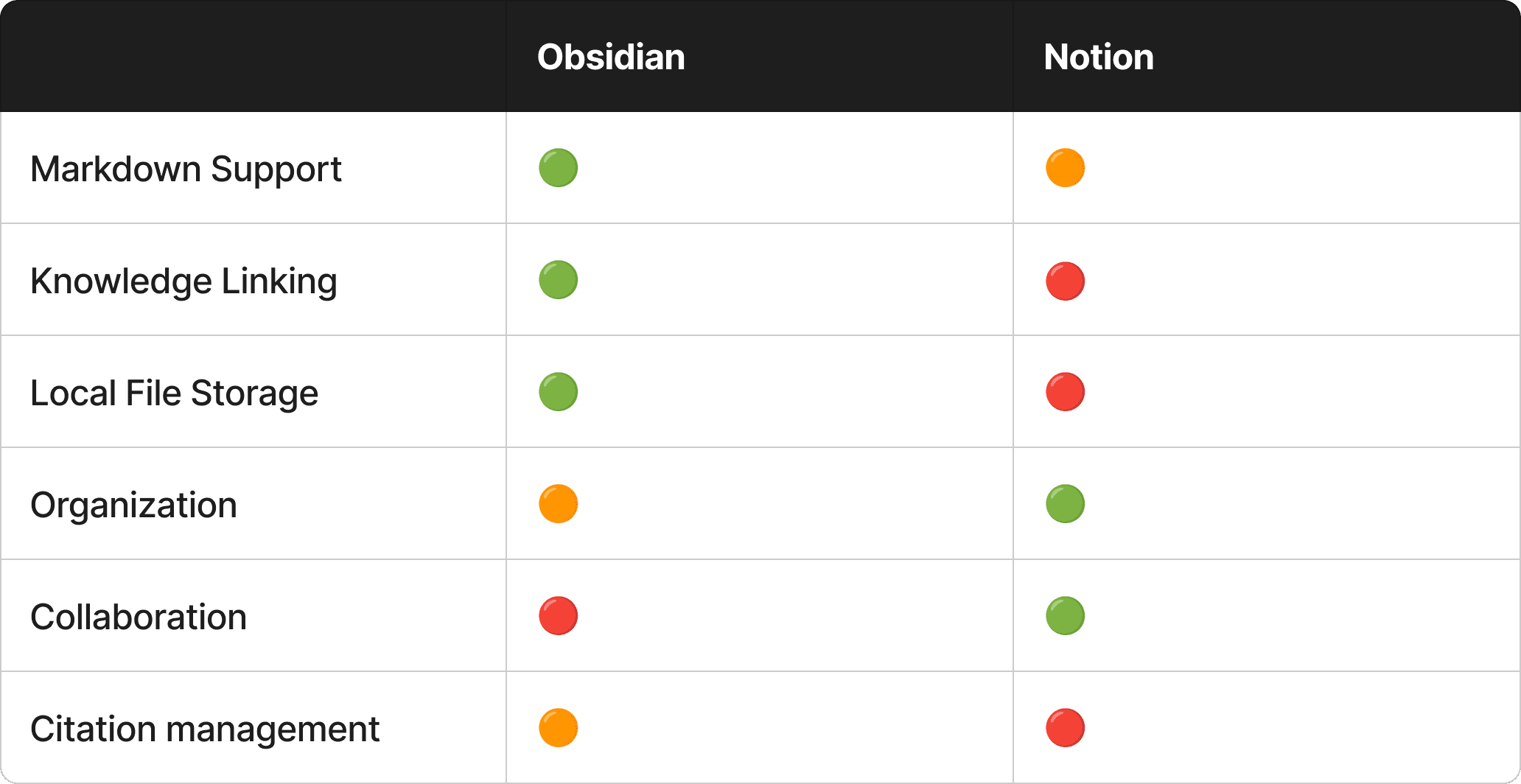
Obsidian and Notion both have their strengths and weaknesses. Obsidian’s learning curve can be steep for new users, especially when utilizing advanced features, but it is perfect for deep, individual research with its robust note-taking and linking capabilities. Choose Obsidian if you value privacy, customization, and handling large databases locally. Notion, on the other hand, is better for users who want an all-in-one experience with its native Notion AI, collaborative tools, and structured project management. However, Notion’s interface can become overwhelming due to its many features, which may require significant time to master. Choose Notion if you need an integrated workspace for collaboration, automation, and managing complex research projects.
We also recommend you check out this ready-made template called Obsibrain, which is ideal if you want a fresh start in Obsidian with all the best practices implemented.

Markdown and LaTeX Support
When it comes to Markdown and LaTeX support, Obsidian and Notion offer different experiences. For academic writing, especially where mathematical equations (LaTeX) and technical content are involved, these differences can be crucial.
Obsidian fully supports Markdown. You can format text easily and include LaTeX for typesetting math. This makes Obsidian ideal for academic writing. It ensures all your notes display correctly, with syntax highlighting for references.
Notion, on the other hand, uses a more visual approach. It offers a toolbar for creating and formatting notes, which is user-friendly but limits Markdown's flexibility. Notion's handling of LaTeX is less intuitive. It requires double dollar signs for math, which isn't consistent with most Markdown documents. This can make your workflow cumbersome, especially if you frequently switch between Notion and other Markdown-based tools.
Here's a quick comparison:
-
Obsidian:
-
Markdown: Full support, easy formatting, and syntax highlighting.
-
LaTeX: Seamless integration, ideal for math and technical content.
-
Flexibility: High, perfect for detailed academic work.
-
-
Notion:
-
Markdown: Limited support, mostly visual formatting via toolbar.
-
LaTeX: Requires double dollar signs, less intuitive.
-
Flexibility: Lower, better for general note-taking and project management.
-
If your academic research involves heavy use of Markdown and LaTeX, Obsidian is your go-to. Its robust support for these formats ensures your notes are always clear and precise. Notion, while versatile, may fall short for more technical academic needs. Choose the tool that fits your specific requirements.

Citation Management
Managing citations is a crucial part of academic research. Obsidian and Notion handle this differently, impacting your workflow and efficiency.
Obsidian shines with its citations plugin, which integrates seamlessly with reference managers like Zotero. This means you can easily insert citations and bibliographies directly into your notes without switching tools. The plugin supports various citation styles, making it adaptable for different academic requirements. For example, you can quickly cite a paper using a simple command, and the plugin handles the formatting.
Notion, on the other hand, takes a more manual approach to citations. You often need to copy and paste references from external tools, which can disrupt your workflow. While you can create databases to manage references, this requires additional setup and maintenance. Notion lacks native support for popular reference managers, meaning you'll spend more time managing citations, which can be frustrating during intense research periods.
Here's a quick comparison:
-
Obsidian:
-
Plugin Integration: Direct integration with Zotero and other reference managers.
-
Ease of Use: Simple commands for inserting and formatting citations.
-
Efficiency: Streamlined process saves time and reduces errors.
-
-
Notion:
-
Manual Entry: Requires copying and pasting from external tools.
-
Setup: Needs additional databases for managing citations.
-
Time-Consuming: More steps involved, disrupting workflow.
-
If managing citations efficiently is a priority, Obsidian is the clear winner. Its robust plugin support keeps your research process smooth and organized. Notion may offer versatility in other areas, but when it comes to citation management, it can't compete with Obsidian's streamlined capabilities.
Organizing Research Notes
Organizing research notes can make or break your productivity.
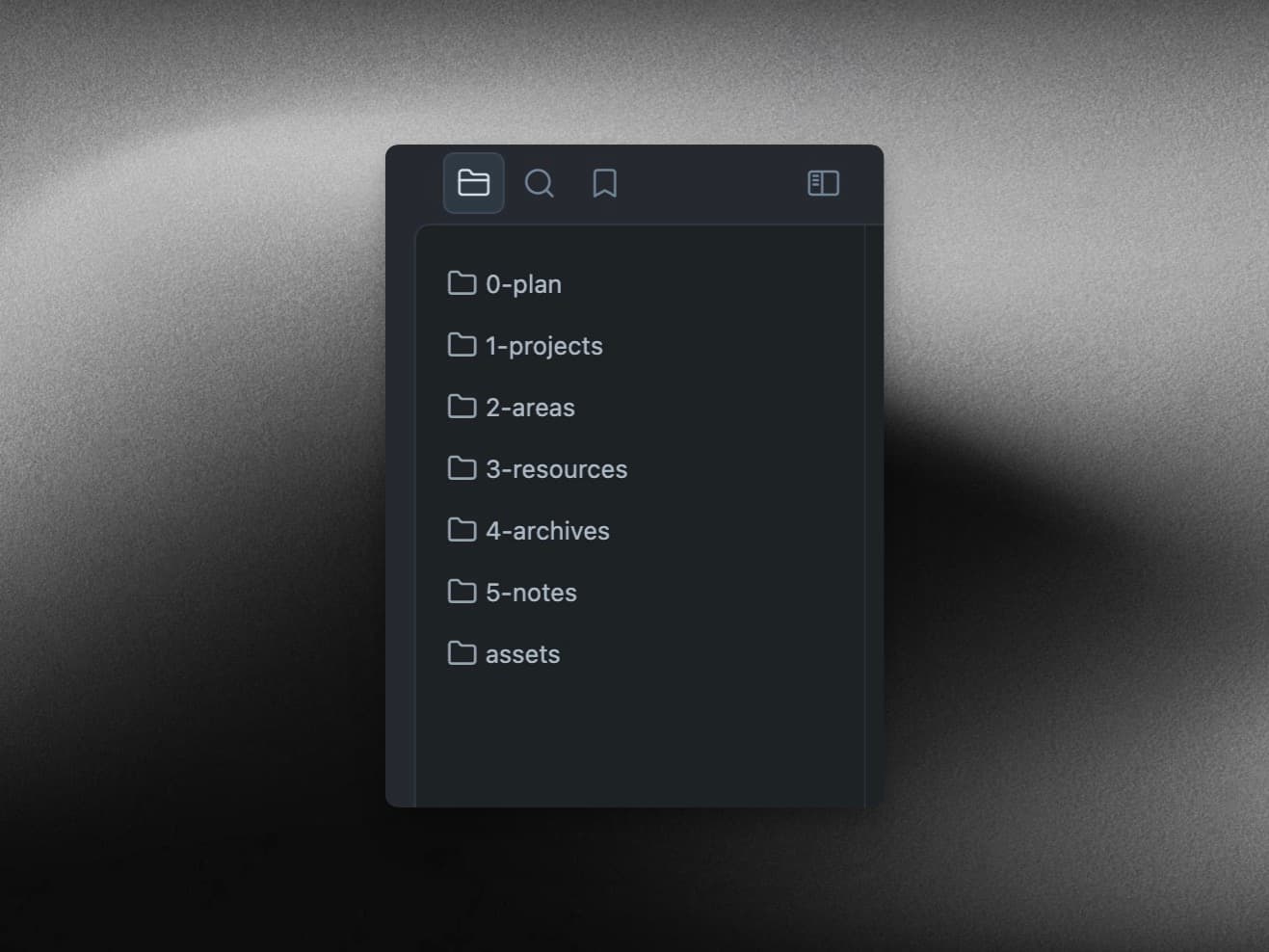
Obsidian’s folder structure and bi-directional linking (knowledge linking) create a connected knowledge base. This means you can easily link related notes and see how they interconnect, which is invaluable for deep research. For example, linking a note on a specific theory to various related studies can help you see patterns and relationships. The P.A.R.A. folder structure (Projects, Areas, Resources, Archives) keeps everything organized and easy to navigate. Obsidian also offers a daily notes feature, allowing users to start each day with a fresh note for journaling, planning, or quickly capturing fleeting ideas, all seamlessly integrated into the broader knowledge base.
Notion uses a hierarchical database structure, which is great for organizing various types of information. You can create databases for different subjects, projects, or research areas. This is useful for managing complex projects and collaborating with others. However, Notion’s lack of bi-directional linking makes it less effective for connecting related notes. Notion's performance can lag when working with large databases, especially when filtering or sorting complex views, which can impact user experience.
Your choice depends on whether you prioritize deep linking and individual research or project management and collaboration.
Handling Multimedia Content
Handling multimedia content is crucial for academic research.
Let's see how Obsidian and Notion stack up.
Obsidian supports displaying PDFs and images directly within notes. This is super handy for researchers who need to reference documents or visual aids without constantly switching tools. You can embed these files using Markdown, keeping your notes and resources in one place. However, Obsidian requires some manual formatting, which can be a bit cumbersome.
Notion allows you to add pictures, videos, and links to your notes easily. Its visual approach makes it straightforward to drag and drop multimedia elements. But, Notion struggles with displaying PDFs interactively. You can embed them, but they don't offer the same seamless integration as Obsidian. Also, Notion's limited Markdown support can be a drawback for those who prefer text-based formatting over the visual editor.
-
Obsidian:
-
Pros: Direct embedding of PDFs and images, consistent formatting with Markdown.
-
Cons: Requires manual setup for optimal display.
-
-
Notion:
-
Pros: Easy to add multimedia, user-friendly drag-and-drop interface.
-
Cons: Limited PDF interaction, less Markdown flexibility.
-
If your research involves heavy use of PDFs and detailed formatting, Obsidian is the better choice. Its robust Markdown support and direct embedding keep your workflow tight. Notion is more versatile for mixed-media content but may fall short for intensive academic needs.
Choose the tool that fits your multimedia requirements. Both have strengths, but understanding their limitations will help you make the best choice for your research.

Collaboration and Teamwork
Collaboration and teamwork are crucial factors when choosing a note taking app or knowledge management tool, especially for academic research projects that involve multiple contributors. Notion stands out as a top choice for team collaboration, offering a suite of collaboration features designed to streamline group work. With real-time co-editing, team members can work together on the same page, leave comments, tag colleagues with mentions, and provide instant feedback. These capabilities make Notion an excellent project management tool for research groups, academic teams, or anyone managing complex projects with others. Its all-in-one workspace approach ensures that everyone stays on the same page, making it easy to manage projects, assign tasks, and track progress.
Obsidian, in contrast, is tailored for individual knowledge workers who prioritize personal knowledge management. While Obsidian excels at helping users build a personal knowledge network with its graph view and advanced linking capabilities, its collaboration features are limited. There’s no built-in real-time collaboration, but users can share their work by exporting notes as PDFs or publishing selected notes online using Obsidian Publish. This makes Obsidian ideal for power users who value a distraction-free writing environment and complete control over their notes, rather than frequent team collaboration.
In summary, if your academic workflow relies on team collaboration and project management, Notion’s robust collaboration features and project management tools make it the better choice. For those focused on deep, individual research and building a personal knowledge management system, Obsidian excels with its advanced features and graph view for linking notes.
Data Security and Privacy
When it comes to data security and privacy, the differences between Obsidian and Notion are significant and can influence your choice of note taking app or knowledge management tool. Obsidian puts data ownership and privacy at the forefront by storing your notes locally as plain-text Markdown files. This means you have complete control over your information, with no reliance on a proprietary database or third-party servers. Local storage ensures offline access, so you can work on your notes anytime, anywhere, without needing an internet connection. This approach also enhances data sovereignty, as your notes remain on your device unless you choose to sync them using a service like Obsidian Sync or another cloud provider.
Notion, on the other hand, is built around cloud storage. All your notes and databases are stored on Notion’s servers, which enables seamless syncing across devices and supports real time collaboration features. Notion implements strong security measures, including two-step verification, GDPR compliance, and encryption for data in transit and at rest. However, some users may be concerned about data security risks associated with cloud storage, such as potential data loss or breaches. Additionally, Notion’s proprietary database structure can make it challenging to move your data to other tools if you decide to switch platforms, limiting your flexibility and control.
For users who prioritize data security, privacy, and complete control over their notes, Obsidian’s local storage and data sovereignty make it an attractive choice. If you value the convenience of cloud storage and collaboration, and are comfortable with Notion’s security protocols, Notion remains a strong contender. Ultimately, your decision should reflect your specific needs for offline access, data ownership, and the level of control you want over your academic research notes.
Syncing and Storage
Syncing and storage are crucial for academic research. Obsidian and Notion offer different approaches.
Obsidian stores files locally. Obsidian relies on Markdown as its core format, and Obsidian notes are stored as plain-text Markdown files, granting users complete ownership and data sovereignty, and making them compatible with any other Markdown editor. This means your data is always accessible, even without an internet connection. For researchers working in environments with unreliable internet, this is a significant advantage. Local storage also ensures faster performance, especially with large file attachments. Obsidian excels at data sovereignty and speed, as it stores notes locally as plain-text Markdown files that work 100% offline. However, Obsidian’s free version doesn’t include cloud features. You’ll need to pay for options like syncing and publishing, which might be a drawback for some users. Obsidian offers a dedicated sync service (Obsidian Sync) as a paid feature, enabling seamless access and data consistency across devices. Also, iCloud syncing can be problematic, and performance may slow down with many attached files. For those transitioning from an old Obsidian vault, it’s important to understand that data migration requires manual actions to ensure proper integration. Moving data from Obsidian is straightforward due to its Markdown format, while Notion's proprietary format complicates exporting and moving data. You can learn more about how to migrate data from an old vault to an Obsibrain vault by following our detailed guide. Obsidian's local storage limits its integration options compared to Notion.
-
Obsidian:- Local Storage: Always accessible, even offline.
-
Performance: Fast with local files, slower with many attachments.
-
Cloud Options: Paid syncing and publishing.
-
Sync Service: Obsidian Sync enables seamless multi-device access.
-
Data Sovereignty: Complete ownership with plain-text Markdown files.
-
Moving Data: Easy export and migration due to Markdown compatibility.
Notion, on the other hand, uses cloud-based storage. Notion's data is stored on company servers (your Notion workspace), which raises concerns about privacy and potential data loss. This means your notes sync seamlessly across devices. Whether you’re on your laptop, tablet, or phone, your data is always up-to-date. This is a big plus for researchers who need constant access to their notes. Notion's integration capabilities with third party apps are extensive, allowing users to connect with tools like Google Drive, Slack, and more. You can sync Notion with other tools or chatbots using official APIs, integrations like Zapier, or local plugins, enabling retrieval-augmented question answering and workflow automation. However, Notion’s cloud storage means you need an internet connection to access your data. The interface can also be more complex when it comes to organizing content, which might slow down your workflow. Moving data out of Notion can be more complicated due to its proprietary format.
-
Notion:- Cloud Storage: Seamless syncing across devices.
-
Accessibility: Requires internet connection.
-
Interface: More complex for organizing content.
-
Integration: Extensive support for third party apps, including Google Drive.
-
Sync Notion: Easily connect Notion with other tools via APIs and automation platforms.
-
Data Location: Stored on company servers, raising privacy and data loss concerns.
-
Moving Data: Exporting and migrating data is more restrictive due to proprietary format.
For researchers who need reliable access to their notes offline and value performance with large files, Obsidian is the better choice. If seamless syncing across multiple devices and easy access to your notes from anywhere are more important, Notion is the way to go. Choose the tool that fits your syncing and storage needs.
Conclusion: Which Is Better?
Obsidian and Notion both have their strengths, but the best tool for academic research depends on what you need.
Obsidian excels in deep linking, Markdown support, and offline accessibility. It’s perfect for individual research with its robust note-taking and citation management through plugins. The P.A.R.A. folder structure and bi-directional linking create an interconnected knowledge base, ideal for detailed academic work. Obsidian is best for a personal knowledge management (PKM) database due to its longevity and linking capabilities.
Notion, on the other hand, shines in project management and collaboration. Its hierarchical structure and databases make it excellent for organizing complex projects and working with teams. Notion is best for a corporate wiki or shared knowledge database and is generally preferred by tech startups for centralizing project management, meeting notes, and company wikis in one collaborative, searchable cloud space. However, it lacks the flexibility and depth of Markdown and LaTeX support that Obsidian offers, which can be a deal-breaker for technical writing.
Both tools can be integrated with business apps, but Notion’s cloud-based approach makes it more suitable for team-based workflows.
When it comes to syncing and storage, Obsidian’s local storage ensures offline access, while Notion’s cloud-based approach offers seamless syncing across devices. Your choice here will depend on whether you value offline capabilities or constant access across platforms.
In terms of handling multimedia content, Obsidian’s Markdown-based embedding is great for consistency, while Notion’s visual approach makes adding media straightforward but less effective for PDF interaction.
If you need a tool for in-depth, individual research with strong note interconnectivity and offline access, Obsidian is the way to go.
For project management, collaboration, and a more visual approach, Notion is your best bet. Evaluate your specific needs to choose the right tool for your academic research. If you are interested in networked note-taking for a particular topic, you might also consider alternatives like Roam Research, which offers unique features such as bidirectional linking and a non-hierarchical approach to organizing notes.
If you’re thinking about switching to Obsidian, we recommend checking out the Obsibrain productivity template which will help you get started with the best practices.
Obsibrain
Get the complete Obsidian second-brain system
Skip the 20-hour setup spiral. Templates, dashboards, and workflows ready in about 30 minutes — no coding required.
$49 one-time payment. Backed by our 30-day guarantee.